Image Finder & Definer
View images and definitions related to highlighted text. Generates an image and defines whatever you highlight or right click and ask it to. Very clean extension.
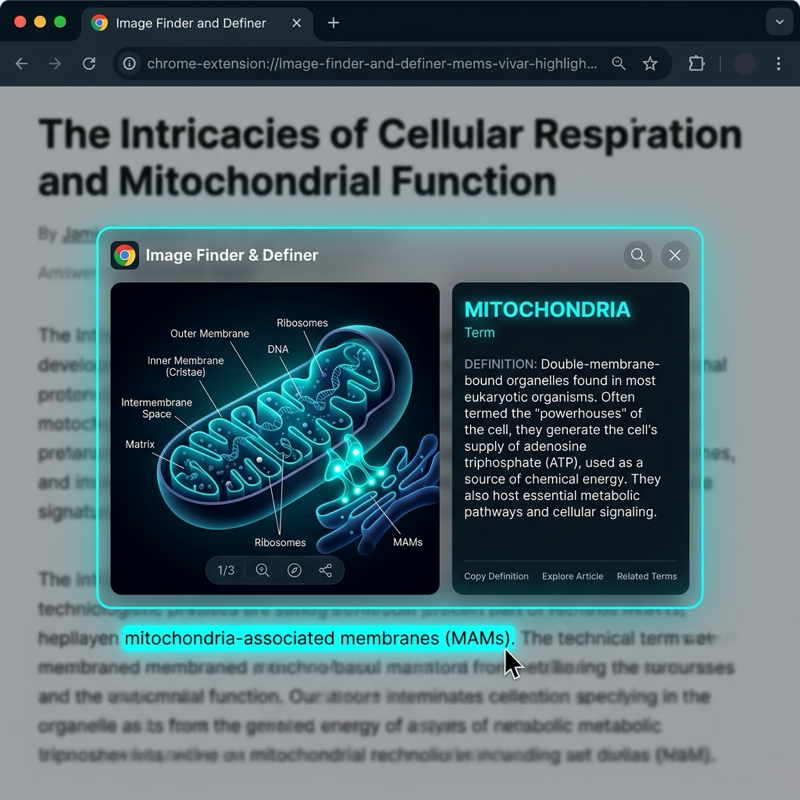
Image Finder & Definer
Image Finder & Definer is an educational Chrome utility that helps users learn new vocabulary and study complex texts by dynamically retrieving visual definitions and context on highlight.
The Problem
When reading scientific literature, dense medical textbooks, or technical documentation, students and professionals frequently encounter complex, abstract, or rare terminology. While standard dictionary lookups provide textual explanations, humans process visual information 60,000 times faster than text.
Traditional workflows require the user to:
- Highlight the term.
- Open a new browser tab.
- Search Google Images.
- Filter out irrelevant diagrams or low-resolution sketches.
This friction breaks focus, reducing overall study efficiency.
The Solution: Real-Time Contextual Visualizer
Image Finder & Definer resolves this loop by bringing definitions and customized diagrams directly to the text:
- Instant Context Menus: Select any word or phrase on any web page, right-click, and select “Define & Visualize.”
- AI-Powered Definition Generation: Queries OpenAI APIs to format a concise, high-yield explanation tailored to the context of the page.
- Custom Schematic Diagrams: Generates styled 3D biological/technical diagrams using AI text-to-image pipelines.
- Personal Vocabulary Vault: Saves parsed words and images into an interactive study deck for spaced repetition review.
Technical Architecture
The extension implements a non-intrusive modal overlay system built on Manifest V3:
┌────────────────────────────────────────────────────────┐
│                   Active Browser Tab                   │
├────────────────────────────────────────────────────────┤
│  User highlights text and triggers context menu        │
│                                                        │
│  ┌──────────────────────────────────────────────────┐  │
│  │ Injected CSS/JS Glassmorphism Popover Card       │  │
│  │ - Displays AI definition & generated diagram     │  │
│  └────────────────────────▲─────────────────────────┘  │
└───────────────────────────┼────────────────────────────┘
                            │ Send Assets / JSON
                            ▼
┌────────────────────────────────────────────────────────┐
│             Background Service Worker (MV3)            │
│  - Captures highlight events and handles api relays   │
└───────────────────────────┬────────────────────────────┘
                            │ Fetch Request (Secure API)
                            ▼
┌──────────────────────────────────────────┐  ┌──────────┐
│              OpenAI API                  │  │ Local    │
│  - Generates clear, high-yield summaries  │  │ Chrome   │
│  - Prompts DALL-E for custom 3D visuals  │  │ Storage  │
└──────────────────────────────────────────┘  └──────────┘
🛠️ Stack & Architecture
- Chrome Extension API Integration: Uses service workers, background scripts, and context menu events to handle text selections.
- OpenAI (GPT & DALL-E) Core: Translates abstract medical, biological, or technical queries into structured image prompts and definitions.
- Glassmorphic Floating Widget: Injects responsive HTML/CSS structures directly into the webpage’s DOM. The overlay is carefully isolated from the site’s native styles using CSS shadow boundaries, preventing style leakage.