AI Patient Simulator
An interactive clinical simulation platform built for medical students to practice patient history taking, diagnostics, and board-style triage.
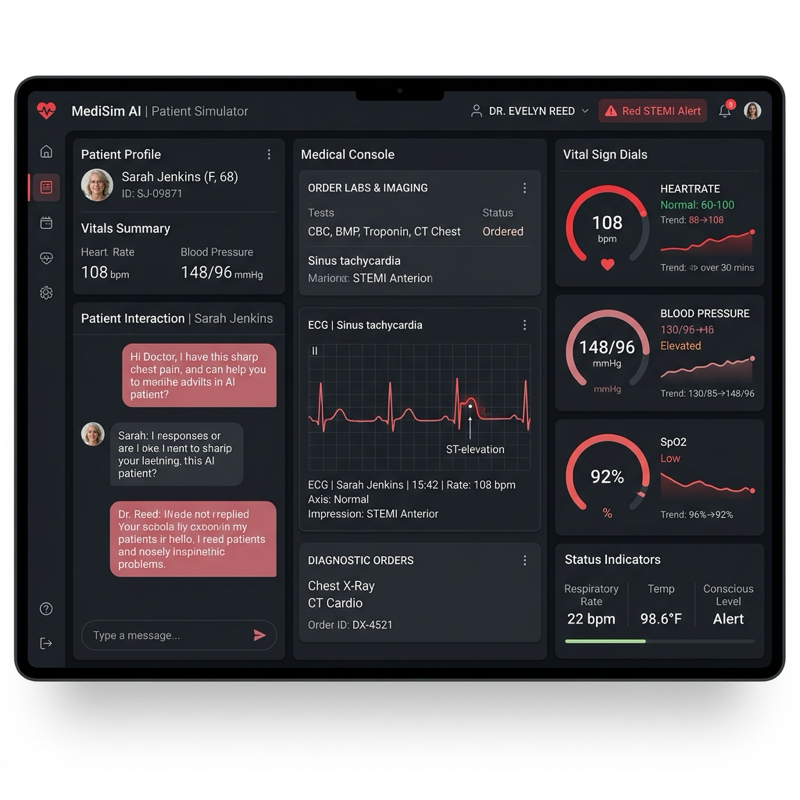
AI Patient Simulator
The AI Patient Simulator is an interactive, web-based clinical simulator designed to bridge the gap between academic medical study and hands-on patient interaction. Medical students take the role of an attending physician—interviewing an AI-driven patient, ordering laboratory panels, reviewing imaging, and rendering diagnoses under clinical time limits.
The Need
In medical education, students spend thousands of hours memorizing textbooks and multiple-choice questions. However, the actual practice of medicine is non-linear. When a patient presents with abdominal pain, they do not offer their symptoms in a structured format.
Attending students must ask open-ended questions, exclude life-threatening emergencies, order appropriate tests (without waste), and formulate a diagnostic plan.
+-----------------------------------------------------------+
|                  AI Patient Simulator UI                  |
+-----------------------------------------------------------+
  | (Student type: "When did the chest pain start?")
  v
+-----------------------------------------------------------+
|                 Dialogue Engine & Context                 |
|  - Patient Persona (e.g., 54yo male with angina)          |
|  - Conversational History Buffer                          |
+-----------------------------------------------------------+
  |
  v
+-----------------------------------------------------------+
|                     Attending LLM Core                    |
|  - Renders replies in patient's voice                     |
|  - Tracks "hidden clues" unlocked by correct questions    |
+-----------------------------------------------------------+
  | (Patient response: "It started about an hour ago...")
  v
+-----------------------------------------------------------+
|                 Attending Laboratory Hub                  |
|  - Orders: ECG, Cardiac Enzymes, Chest X-Ray              |
|  - Renders physical test results & visual logs            |
+-----------------------------------------------------------+
How It Works
1. Conversational Patient Personas
Using advanced language models trained on specific clinical dossiers, the simulator runs patients with unique personalities, medical histories, and communication barriers (e.g., anxiety, vague symptoms). The AI only reveals critical history items (such as a family history of early heart attacks) if the student asks targeted, professional questions.
2. Live Diagnostic Testing
Students have access to an interactive terminal where they can order labs, vitals, and imaging:
- Immediate results: ECG prints, vitals checks.
- Delayed results: Blood cultures, complex metabolic panels.
- Visual findings: Actual radiological images, slides, or pathology findings are displayed in the media viewer panel when ordered.
3. State-Machine Trajectory
The simulation is governed by a state machine that tracks the patient’s stability. If a student ignores a critical vital sign (e.g., severe hypotension) and orders slow imaging rather than immediate fluid resuscitation, the patient’s state deteriorates, simulating real-life clinical consequences.
4. Post-Simulation Assessment
At the conclusion of each run, the simulator generates a detailed performance report comparing the student’s choices against established guidelines:
- Diagnostic Accuracy: Was the final diagnosis correct?
- Efficiency: Were unnecessary, expensive tests ordered?
- History Completeness: Did the student uncover all crucial risk factors?
- Communication Score: Did the student maintain empathy and clarity?
Tech Stack
- Frontend Interface: React, TailwindCSS, and state managers. Includes custom media viewers for chest X-rays, ECG outputs, and sound clips for lung/heart auscultations.
- AI Engine: Node.js microservices interfacing with OpenAI’s API. Employs structured system prompting and dynamic context window truncation to ensure fast response times.